Lesson 7 of 15 · ~22 min
Security Policies and Risk Management
Risk language for real organizations.
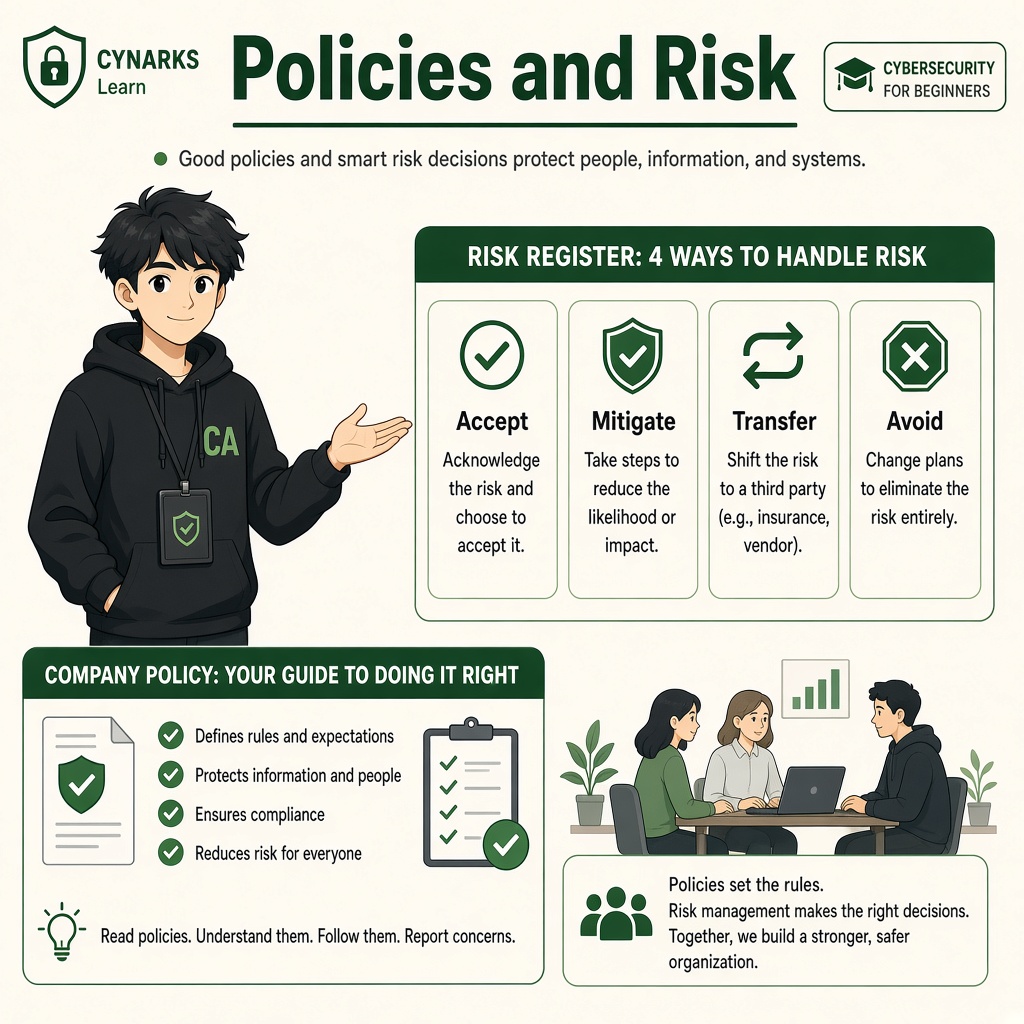
Security Policies and Risk Management
Module 1 · Introduction to Cybersecurity · Beginner Level
Learn how organizations create security rules, identify risks, make security decisions and protect their business operations.
1. Let's Understand Security Policies and Risk Management
Imagine you start a small company with five employees.
Your company uses:
- Gmail for business communication.
- Google Drive for documents.
- A customer database.
- Online payment applications.
- Company laptops.
- A website.
Initially, everything works smoothly.
But as your company grows, different problems start appearing.
- An employee shares the company password with a friend.
- Someone uploads customer information to a personal Google Drive.
- An intern shares an API key in a WhatsApp group.
- An employee downloads untrusted software.
- Important business files are deleted accidentally.
Why are these problems happening?
Because employees do not have clear security rules, responsibilities or procedures.
This is where Security Policies and Risk Management become important.
What is a Security Policy?
A security policy is a documented set of rules that explains how an organization protects its information, systems, devices and resources.
It tells employees:
- What they are allowed to do.
- What they are not allowed to do.
- How they should handle company information.
- Who can access specific systems.
- What to do when a security incident happens.
Simple meaning: A security policy tells everyone how to behave securely.
What is Risk Management?
Risk Management is the process of identifying possible problems, understanding how serious they could be, and deciding what actions should be taken to reduce their impact.
Simple meaning: Risk Management helps an organization understand what could go wrong and prepare for it.
2. Why Do Organizations Need Security Policies?
Imagine two companies.
Company A – No Security Policies
Employees:
- Share passwords through WhatsApp.
- Use personal devices without security checks.
- Download software without approval.
- Share customer information freely.
- Do not report suspicious emails.
Everyone follows their own rules.
This creates security problems.
Company B – Proper Security Policies
Employees:
- Use individual accounts.
- Enable MFA.
- Follow approved software installation procedures.
- Share confidential information only with authorized people.
- Report suspicious activities.
- Follow company backup procedures.
Everyone understands their responsibilities.
Company B has a more organized security environment.
Important: Policies cannot guarantee that attacks will never happen. They help establish consistent security practices and reduce avoidable risks.
3. Different Types of Security Policies
Organizations create different policies depending on their business, systems and security requirements.
Let's understand some common examples.
1. Password Policy
Explains how employees should create and protect passwords.
It may include:
- Use unique passwords for different accounts.
- Never share passwords.
- Use an approved password manager.
- Enable MFA wherever available.
- Change compromised passwords immediately.
Example: Employees must use individual company accounts instead of sharing one common login.
2. Acceptable Use Policy (AUP)
Explains how employees are allowed to use company devices, networks and applications.
It may include:
- Do not install unauthorized software.
- Do not use company devices for prohibited activities.
- Do not access unauthorized websites or systems.
- Follow company internet usage rules.
Example: Employees cannot install pirated software on company laptops.
3. Access Control Policy
Defines who can access company systems and information.
It explains:
- Who can view information.
- Who can modify information.
- Who can approve access.
- When access should be removed.
Example: An HR employee can access employee records, but an intern may not have permission to view confidential salary information.
4. Data Protection Policy
Explains how sensitive information should be collected, stored, accessed, shared and deleted.
It may include:
- Protect customer information.
- Encrypt sensitive data where appropriate.
- Restrict access to confidential documents.
- Follow approved data-sharing procedures.
- Dispose of information securely.
Example: Employees cannot upload customer databases to personal cloud storage without authorization.
5. Backup Policy
Explains how frequently important information should be backed up and how it should be restored.
It may include:
- Backup schedules.
- Backup storage locations.
- Access restrictions.
- Retention periods.
- Regular restoration testing.
Example: A company backs up its important business database regularly and tests whether the backups can actually be restored.
6. Incident Response Policy
Explains what employees and security teams must do when a security incident occurs.
It may include:
- How to report suspicious activities.
- Who should be informed.
- How affected systems should be isolated.
- Who investigates incidents.
- How recovery should happen.
Example: If an employee suspects ransomware, they must immediately notify the IT or security team and follow the incident-response procedure.
7. Remote Work Policy
Explains how employees should securely access company resources while working outside the office.
It may include:
- Use approved devices.
- Secure home Wi-Fi.
- Use company-approved remote access methods.
- Avoid sharing devices with unauthorized users.
- Protect confidential information in public places.
Example: Employees must use approved company remote access systems when connecting to internal resources.
4. Policy vs Standard vs Procedure vs Guideline
These terms are often used in cybersecurity documentation.
Although they are related, they have different purposes.
| Term | Meaning | Example |
|---|---|---|
| Policy | Defines the rule or requirement | Employees must protect company accounts |
| Standard | Defines mandatory requirements | MFA must be enabled for company accounts |
| Procedure | Explains how to perform a task | Steps to enable MFA |
| Guideline | Provides recommended advice | Use a password manager for better security |
Simple Example
Imagine your company wants to protect employee accounts.
Policy: All employees must protect their company accounts.
Standard: MFA is mandatory for all supported company accounts.
Procedure: Follow these steps to enable MFA.
Guideline: Prefer an approved authenticator application over less secure verification methods where supported.
Remember: Policy tells what must happen, standards define specific requirements, procedures explain how to do it, and guidelines provide recommendations.
5. What Is Risk in Cybersecurity?
Every organization faces risks.
A risk is the possibility that a threat will exploit a vulnerability and cause harm to an asset.
Let's understand with a simple example.
Imagine a company stores customer information in a database.
- Asset: Customer database.
- Threat: Cybercriminal attempting unauthorized access.
- Vulnerability: Weak database access controls.
- Risk: Customer information could be exposed.
Risk management helps the organization understand this situation and decide what to do.
Risk Is Not Limited to Hackers
Risks can also come from:
- Employee mistakes.
- Hardware failures.
- Software bugs.
- Power outages.
- Natural disasters.
- Accidental data deletion.
- Third-party service failures.
Important: Not every risk is caused by a cybercriminal.
6. How Does Risk Management Work?
Organizations generally follow a continuous process to manage risks.
Let's understand the five basic steps.
Step 1 – Identify Assets
First, identify what needs protection.
Examples:
- Customer databases.
- Employee records.
- Payment systems.
- Company websites.
- Source code.
- Business email accounts.
Step 2 – Identify Threats and Vulnerabilities
Understand what could go wrong.
Example:
A company uses an outdated application with a known security weakness.
- Threat: An attacker attempting to exploit the application.
- Vulnerability: The unpatched software.
- Asset: Customer information stored in the application.
Step 3 – Assess the Risk
Understand how likely the problem is and how serious the consequences could be.
For example:
If the application contains sensitive customer information and is exposed to the internet, unauthorized access could cause serious damage.
Step 4 – Treat the Risk
Choose an appropriate action.
The organization may:
- Reduce the risk.
- Avoid the risk.
- Transfer or share the financial impact.
- Accept the risk.
We will understand these four options in the next section.
Step 5 – Monitor and Review
Risk management does not end after implementing security controls.
Organizations should:
- Check whether security controls are working.
- Review new vulnerabilities.
- Monitor incidents.
- Update policies.
- Reassess risks when systems or business operations change.
Simple process:
Identify → Assess → Treat → Monitor → Review.
7. Four Ways to Handle Cybersecurity Risks
One of the most important concepts in risk management is understanding how organizations treat risks.
There are four common risk treatment options.
1. Risk Avoidance
Risk Avoidance means eliminating a risky activity instead of continuing it.
Example:
A company discovers that an old, unsupported application creates significant security risks.
Instead of continuing to use it, the company decides to stop using that application and replace it with a supported alternative.
Simple meaning: Stop the activity that creates the risk.
2. Risk Reduction (Mitigation)
Risk Reduction means implementing security measures to reduce the likelihood or impact of a risk.
Example:
A company discovers that employees use weak passwords.
It introduces:
- Strong password requirements.
- MFA.
- Account monitoring.
- Employee awareness training.
These measures reduce the risk of unauthorized account access.
Simple meaning: Take action to make the risk smaller.
3. Risk Transfer or Sharing
Risk Transfer means shifting or sharing certain financial consequences of a risk with another party.
Cyber insurance is one example.
Example:
A company purchases cyber insurance to help cover certain financial losses resulting from eligible cyber incidents.
However, insurance does not prevent cyberattacks, and it does not remove the company's responsibility to protect its systems.
Simple meaning: Share some financial consequences with another party.
4. Risk Acceptance
Risk Acceptance means knowingly deciding to live with a risk after evaluating it.
This is generally used when the risk is within the organization's approved tolerance and further treatment is not justified or practical.
Example:
A company identifies a minor risk associated with its public marketing website.
After assessing the likelihood and impact, management formally accepts the remaining risk and continues monitoring it.
Simple meaning: Understand the risk and consciously decide to accept it.
Risk Treatment – Quick Comparison
| Option | What It Means | Example |
|---|---|---|
| Avoid | Stop the risky activity | Remove an unsafe application |
| Reduce | Implement protective measures | Enable MFA |
| Transfer | Share financial consequences | Cyber insurance |
| Accept | Formally live with the risk | Accept a low-level risk with monitoring |
Important: Accepting a risk does not mean ignoring it. It should be documented, approved by the appropriate authority and reviewed periodically.
8. Understanding Risk Assessment
Risk Assessment means evaluating identified risks to understand their potential seriousness.
Two important factors are commonly considered:
1. Likelihood: How likely is the incident to happen?
2. Impact: How much damage could it cause?
A simple introductory approach is:
Risk Score = Likelihood × Impact
For example, use a scale of 1 to 5.
Likelihood Scale
| Score | Meaning |
|---|---|
| 1 | Rare |
| 2 | Unlikely |
| 3 | Possible |
| 4 | Likely |
| 5 | Almost certain |
Impact Scale
| Score | Meaning |
|---|---|
| 1 | Very Low |
| 2 | Low |
| 3 | Moderate |
| 4 | High |
| 5 | Severe |
Example Risk Calculation
Imagine a company has an outdated internet-facing application.
The security team estimates:
- Likelihood = 4
- Impact = 5
Risk Score:
4 × 5 = 20
This indicates a high-priority risk under this example scoring model.
Another example:
A non-critical office printer has a minor configuration issue.
- Likelihood = 2
- Impact = 1
Risk Score:
2 × 1 = 2
This represents a lower-priority risk under the same model.
Remember: This scoring system is a simplified learning method. Real organizations may use different assessment methods, risk matrices and business-specific criteria.
9. Understanding a Risk Matrix
A Risk Matrix helps organizations visually compare likelihood and impact.
For this beginner example, use the following categories:
- 1–4: Low
- 5–9: Medium
- 10–15: High
- 16–25: Critical
| Likelihood ↓ / Impact → | 1 | 2 | 3 | 4 | 5 |
|---|---|---|---|---|---|
| 5 – Almost certain | Medium | High | High | Critical | Critical |
| 4 – Likely | Low | Medium | High | Critical | Critical |
| 3 – Possible | Low | Medium | Medium | High | High |
| 2 – Unlikely | Low | Low | Medium | Medium | High |
| 1 – Rare | Low | Low | Low | Low | Medium |
This matrix helps teams decide which risks need immediate attention.
For example:
- A critical database vulnerability may require immediate action.
- A low-impact issue may be handled during routine maintenance.
Important: A risk score is a prioritization aid, not a guarantee of actual damage. Business context, legal requirements and criticality also matter.
10. Inherent Risk vs Residual Risk
These are two important terms used in organizational risk management.
Inherent Risk
Inherent Risk is the level of risk before considering the effect of security controls.
Example:
A company database is accessible through an internet-facing application.
Before security controls are considered, unauthorized access could create significant damage.
This is the inherent risk.
Residual Risk
Residual Risk is the risk that remains after security controls have been implemented.
Example:
The company introduces:
- MFA.
- Access restrictions.
- Database monitoring.
- Security updates.
- Regular backups.
The risk becomes lower, but it may not disappear completely.
The remaining risk is called residual risk.
Simple difference:
Inherent Risk = Risk before controls.
Residual Risk = Risk remaining after controls.
11. Security Policies and Risk Management in Real Organizations
Let's understand how different organizations apply these concepts.
Example A – College
A college stores student marks, attendance and fee information.
Possible risks:
- Unauthorized changes to examination marks.
- Student information exposure.
- Loss of examination records.
Possible policies:
- Only authorized staff can modify marks.
- Student accounts must use secure authentication.
- Important records must be backed up.
- Changes to examination records must be logged.
Example B – Startup
A startup uses online payment services and stores customer information.
Possible risks:
- Leaked payment API keys.
- Unauthorized merchant dashboard access.
- Customer data exposure.
- Accidental deletion of business records.
Possible policies:
- Never share API keys publicly.
- Use individual employee accounts.
- Enable MFA for administrative accounts.
- Restrict access based on job responsibilities.
- Rotate exposed credentials immediately.
Example C – Hospital
A hospital stores confidential patient information.
Possible risks:
- Unauthorized access to medical records.
- Ransomware affecting hospital systems.
- Loss of critical patient information.
Possible policies:
- Restrict patient records to authorized personnel.
- Maintain secure backups.
- Protect computers and medical systems.
- Establish incident-response procedures.
- Train employees to identify suspicious communication.
12. Who Is Responsible for Risk Management?
Risk management is not only the responsibility of cybersecurity engineers.
Different people have different responsibilities.
| Role | Responsibility |
|---|---|
| CEO / Management | Approves major risk decisions |
| IT Team | Maintains systems and implements technical controls |
| Security Team | Identifies and evaluates security risks |
| HR Team | Supports employee security policies and training |
| Employees | Follow security policies and report incidents |
| Risk / Compliance Team | Tracks risks and checks relevant requirements |
For example, a cybersecurity analyst may identify a serious database vulnerability.
The security team evaluates the technical risk, while the appropriate management or risk owner makes the formal business decision about treatment and acceptance.
Remember: Security is everyone's responsibility, but risk decisions must have clear ownership.
13. What Is a Risk Register?
A Risk Register is a document used by organizations to record and track identified risks.
It helps teams understand what risks exist, who owns them and what actions are being taken.
Simple Example
| Risk ID | Identified Risk | Level | Treatment | Owner |
|---|---|---|---|---|
| R01 | Weak employee passwords | High | Enforce MFA and password controls | IT Team |
| R02 | No tested database backup | Critical | Implement and test backups | Infrastructure Team |
| R03 | Unrestricted customer data access | High | Apply access restrictions | Security Team |
| R04 | Outdated office software | Medium | Schedule security updates | IT Team |
A real risk register may also contain:
- Risk description.
- Affected assets.
- Threats and vulnerabilities.
- Likelihood and impact.
- Inherent risk.
- Existing controls.
- Residual risk.
- Treatment deadline.
- Approval status.
Simple meaning: A Risk Register is an organization's record of what could go wrong and how it plans to handle it.
Lesson Summary
By completing this lesson, you should understand:
- What security policies are.
- Why organizations need documented security rules.
- Different types of security policies.
- The difference between policies, standards, procedures and guidelines.
- What cybersecurity risk means.
- How organizations identify and assess risks.
- The four risk treatment options.
- Likelihood and impact.
- Risk scoring and risk matrices.
- Inherent and residual risk.
- Risk ownership and responsibilities.
- What a Risk Register is.
Key takeaway:
Cybersecurity is not only about preventing attacks. Organizations must also identify possible risks, establish clear security policies, assign responsibilities and make informed decisions to protect their business.
Coming Next: Password Security and Authentication
You now understand why organizations need security policies and how they manage risks.
In the next lesson, you will learn how passwords protect accounts, why weak and reused passwords are dangerous, how authentication works and how Multi-Factor Authentication adds another layer of protection.
CYNARKS Academy – Learn to Understand. Practice to Defend.
Security policies should be understandable, practical and regularly reviewed. All security testing must be performed only on systems you own or have explicit authorization to test.
End of lesson
Quiz · Tasks · Labs
Pass the quiz (≥70%), check off tasks, then mark the lesson complete to earn Foundations badges.
Scenario check
Real situations — apply the lesson logic; avoid pure memorization.
Answer all, then submit1. What is a security policy?
2. What is Risk Management?
3. A company stops using an unsafe application because the risk is too high. Which risk treatment option is this?
4. A company enables MFA to reduce unauthorized account access. Which option does this represent?
5. A company purchases cyber insurance to help cover eligible financial losses from cyber incidents. Which option is this?
6. What does residual risk mean?
7. Which document helps organizations track identified risks, owners and treatment plans?
8. A company has a vulnerability with likelihood 4 and impact 5. Using the simple scoring method, what is its risk score?
Lesson tasks
Practice labs
Required labs test this lesson’s skills. Related labs are optional previews.
- RequiredRisk IngredientsFundamentals
- RequiredLeast Privilege PolicyCloud Security
Finish the quiz and tasks to unlock Mark as completed.