Lesson 8 of 15 · ~22 min
Network Fundamentals
Hosts, switches, routers, and trust boundaries.
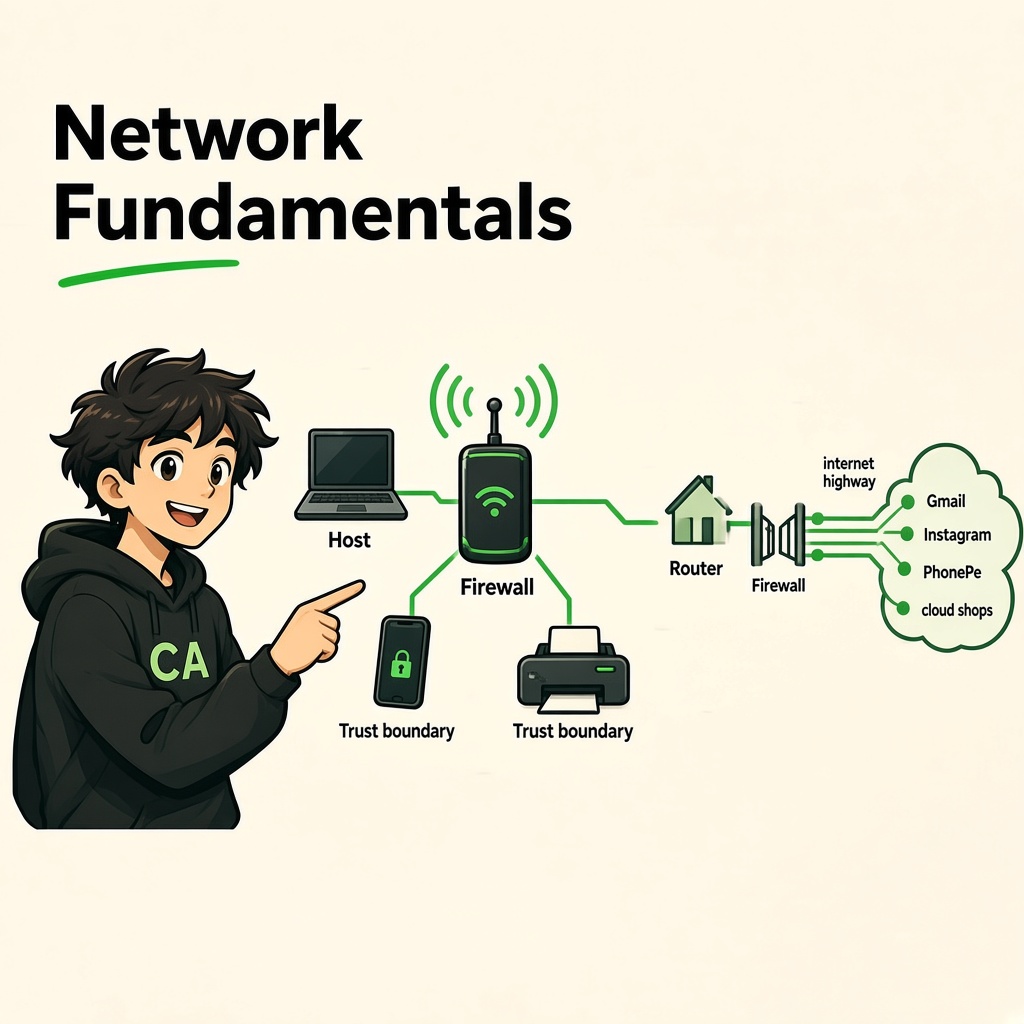
Network Fundamentals
Course: Network Security
Level: Beginner
Topic: Hosts, Switches, Routers, IP Addresses, Firewalls & Trust Boundaries
1. Introduction
A computer network is a group of connected devices that communicate and share information with each other.
Think of a network as a road system:
- Your phone or laptop is a house.
- A network switch is like a local road connecting nearby houses.
- A router is like an intersection that connects different roads and networks.
- The internet is the highway connecting networks around the world.
- A firewall is like a security guard controlling which traffic can enter or leave.
- A trust boundary is where one security zone ends and another begins.
In simple words: A network allows devices to communicate, and network security determines who can communicate with whom.
2. What Is a Host?
A host is a device connected to a network that can send or receive data.
Examples:
- Laptop
- Smartphone
- Desktop computer
- Server
- Smart TV
- CCTV camera
- Network printer
Every host participating in an IP network normally has an IP address.
Example:
Imagine your home Wi-Fi has:
| Device | Example IP address |
|---|---|
| Laptop | 192.168.1.10 |
| Phone | 192.168.1.11 |
| Smart TV | 192.168.1.12 |
| Printer | 192.168.1.13 |
| Router | 192.168.1.1 |
These are example private IP addresses. Your actual addresses may be different.
Remember: A host is an endpoint that communicates over a network. Not every network device is a host; switches and routers primarily perform network infrastructure functions.
3. What Is a Network Switch?
A network switch connects multiple devices within the same local network (LAN).
For example, in a college computer lab, 30 computers may connect to one or more switches.
The switch helps data reach the correct connected device.
How does a switch work?
A typical Layer 2 Ethernet switch uses MAC addresses to forward Ethernet frames.
A MAC address is a hardware-level network identifier associated with a network interface.
Example:
- Computer A sends data to Computer B.
- The switch examines the destination MAC address.
- It checks its MAC address table.
- It forwards the frame through the appropriate port, when it knows the destination.
Security importance:
- Unauthorized devices may connect to unused switch ports.
- Poorly configured networks may expose sensitive devices.
- Network segmentation can separate student, staff, and server devices.
- Port security and network access control can help restrict connections.
4. What Is a Router?
A router connects different IP networks and forwards packets between them.
Example:
Your home Wi-Fi network communicates with the internet through your router.
A router examines the destination IP address and uses its routing table to decide where to forward a packet.
Simple example
Your laptop has an address such as 192.168.1.10.
You open a website hosted outside your home network.
- Your laptop creates network traffic.
- It sends traffic towards its default gateway, usually your home router.
- The router forwards the traffic towards your ISP.
- The traffic travels through other networks.
- The destination server receives the request and responds.
Important distinction:
| Switch | Router |
|---|---|
| Connects devices within a LAN | Connects different IP networks |
| Commonly forwards using MAC addresses | Forwards using IP addresses |
| Primarily operates at Layer 2 | Primarily operates at Layer 3 |
| Maintains a MAC address table | Maintains a routing table |
Some modern devices combine router, switch, firewall, and Wi-Fi access point functions.
5. What Is an IP Address?
An IP address (Internet Protocol address) identifies a network interface so that data can be delivered across IP networks.
There are two main versions.
IPv4
IPv4 uses 32-bit addresses, usually written as four decimal numbers separated by dots.
Example: 192.168.1.10
IPv6
IPv6 uses 128-bit addresses, written in hexadecimal groups separated by colons.
Example: 2001:db8::10
Private and public IP addresses
Private IP: Used inside private networks, such as homes, offices, and colleges.
Common private IPv4 ranges:
10.0.0.0–10.255.255.255172.16.0.0–172.31.255.255192.168.0.0–192.168.255.255
Public IP: Used for communication across the public internet and assigned through an ISP or other network provider.
Example:
Your laptop may have a private IP address, while your router uses a public IP address for internet communication.
Note: NAT (Network Address Translation) is commonly used by home routers to allow multiple private devices to share a public IPv4 address.
6. What Is a Packet?
When information travels across an IP network, it is divided into smaller units called packets.
Think of sending a large parcel by dividing it into smaller packages.
A simplified packet contains:
- Source IP address
- Destination IP address
- Protocol information
- Data being transmitted
The receiving device processes the packets and uses the relevant protocols to handle the data.
Example:
When you open Gmail:
- Your device sends network traffic to Gmail's infrastructure.
- The traffic travels through different networks.
- The destination systems process the request.
- Response data travels back to your device.
Important terms:
- Packet: Network-layer data unit.
- Frame: Data-link-layer unit used for local network delivery.
- Segment: Commonly refers to a TCP transport-layer data unit.
- Payload: The actual data carried by a protocol unit.
These terms are related but are not interchangeable.
7. What Is a Port?
A port number helps identify which application or service should receive network traffic on a device.
Think of an IP address as a building address and a port as a particular room inside that building.
Common examples:
| Port | Common service |
|---|---|
| 20/21 | FTP data/control |
| 22 | SSH |
| 25 | SMTP |
| 53 | DNS |
| 80 | HTTP |
| 443 | HTTPS |
| 3306 | MySQL |
| 3389 | Remote Desktop Protocol (RDP) |
A port being open does not automatically mean a system is vulnerable. It means a service may be listening and accepting connections.
Security importance: Unnecessary exposed services increase the attack surface. Organizations should disable unused services, restrict access, and keep exposed services updated.
8. What Is a Firewall?
A firewall is a security control that monitors and controls network traffic based on configured rules.
It can allow, block, or restrict connections.
Example:
An organization may configure its firewall to:
- Allow employees to access approved websites.
- Block unauthorized inbound connections.
- Restrict access to internal servers.
- Allow administrators to access management systems only through approved paths.
Types of firewalls
- Network firewall: Controls traffic between networks.
- Host-based firewall: Runs on an individual computer or server.
- Next-generation firewall (NGFW): May include application awareness, intrusion prevention, and other advanced security capabilities.
- Web Application Firewall (WAF): Helps protect web applications by filtering HTTP/HTTPS requests.
Remember: A firewall is an important security layer, but it cannot prevent every attack. Secure configurations, patching, authentication, monitoring, and other controls are also necessary.
9. What Is a Trust Boundary?
A trust boundary is a point where data or communication moves between different security zones with different levels of trust.
For example:
- Your personal laptop to home Wi-Fi.
- Home Wi-Fi to the public internet.
- Employee network to the company server network.
- Company network to a third-party vendor network.
- Application server to a database network.
A trust boundary matters because traffic crossing it may need additional security checks.
Example: College network
Imagine a college has:
- Student Wi-Fi
- Faculty network
- Administration network
- Server network
- Guest Wi-Fi
These networks should not automatically trust one another.
For example, a student connected to student Wi-Fi should not automatically have access to faculty computers or administrative records.
That separation is a form of network segmentation.
Why trust boundaries matter
- They reduce unauthorized access.
- They limit the spread of malware.
- They protect sensitive information.
- They reduce unnecessary communication between systems.
- They help organizations enforce least privilege.
10. What Is Network Segmentation?
Network segmentation means dividing a larger network into smaller, separate sections.
Example:
A company can create separate networks for:
- Employees
- Guests
- Servers
- CCTV cameras
- Finance systems
- IT administration
If a guest device becomes infected, proper segmentation and firewall rules can help prevent the infection from reaching sensitive internal systems.
VLAN (Virtual Local Area Network)
A VLAN allows a physical switch network to be logically divided into separate Layer 2 networks.
Example:
- VLAN 10 – Employees
- VLAN 20 – Guests
- VLAN 30 – Servers
VLANs provide logical separation, but they are not a complete security solution by themselves. Traffic between VLANs must be controlled through appropriate routing and security policies.
11. How Network Communication Works
Let's understand what happens when you open a website.
- You enter a website name in your browser.
- DNS helps translate the domain name into an IP address.
- Your device determines whether the destination is local or on another network.
- If the destination is outside your local network, traffic is usually sent to the default gateway.
- Routers forward packets towards the destination.
- The destination server processes the request.
- The server sends a response back.
Important network concepts
DNS (Domain Name System): Translates domain names into IP addresses.
DHCP (Dynamic Host Configuration Protocol): Automatically provides network configuration such as IP addresses to devices.
Default Gateway: The router or other Layer 3 device a host uses to reach destinations outside its local network.
NAT (Network Address Translation): Translates IP address information, commonly allowing private IPv4 devices to share public IPv4 connectivity.
VPN (Virtual Private Network): Creates an encrypted connection over another network, commonly used for secure remote access.
12. Real-World Cybersecurity Case Studies
Case Study 1: Target Data Breach (2013)
Attackers gained access through credentials associated with a third-party HVAC vendor. They then moved into parts of Target's network and stole payment card information from point-of-sale systems.
What went wrong?
Third-party access was not sufficiently isolated and controlled.
What should organizations learn?
- Vendor accounts should have limited permissions.
- Third-party access should be restricted to required systems.
- Sensitive networks should be segmented.
- Unusual network activity should be monitored.
- Vendor access should be reviewed regularly.
Key lesson: A trusted business partner should not automatically receive unrestricted access to an organization's network.
Case Study 2: Colonial Pipeline (2021)
A ransomware incident affected Colonial Pipeline's IT environment. The company temporarily shut down pipeline operations as a precaution.
What was the impact?
The incident affected fuel distribution and caused disruption beyond the company's IT systems.
What should organizations learn?
- IT and operational environments need careful protection.
- Critical services need incident response plans.
- Backups and recovery procedures should be tested.
- Network access should be restricted.
- Business continuity planning is essential.
Key lesson: Cybersecurity incidents can affect real-world services and public availability, not just computers.
Case Study 3: Marriott / Starwood (Disclosed 2018)
Marriott disclosed a breach involving the Starwood guest reservation database. The compromise had existed for an extended period before discovery.
What should organizations learn?
- Acquired systems need security assessments.
- Legacy environments should be reviewed.
- Networks and databases should be properly segmented.
- Monitoring must cover older systems too.
- Mergers and acquisitions require cybersecurity due diligence.
Key lesson: Connecting two organizations also means connecting their security risks.
13. Common Network Security Risks
| Risk | Simple explanation | Security measure |
|---|---|---|
| Unauthorized devices | Unknown devices connect to a network | Network access control |
| Weak Wi-Fi security | Attackers may exploit poor wireless protection | WPA2-AES or WPA3 and strong credentials |
| Flat network | Devices can communicate too freely | Network segmentation |
| Exposed services | Unnecessary services accept connections | Close or restrict unused ports |
| Weak firewall rules | Unwanted traffic may be allowed | Review and test firewall rules |
| Vendor access misuse | Third-party accounts have excessive access | Least privilege and monitoring |
| Unpatched network devices | Known weaknesses remain exploitable | Regular updates and patch management |
14. Tools You Will Meet
Wireshark
Wireshark is a network protocol analyzer. It helps security professionals inspect network packets and understand communication.
You can use it to study:
- Source and destination IP addresses.
- Protocols used by network traffic.
- DNS requests.
- TCP communication.
- Packet flow and connection behavior.
Use Wireshark only on your own device, authorized lab traffic, or networks where you have explicit permission.
Other useful tools
- Ping: Tests basic network reachability.
- Traceroute / Tracert: Shows the network path towards a destination.
- ipconfig / ifconfig / ip: Displays network interface configuration.
- nslookup: Helps investigate DNS resolution.
- Nmap: Discovers hosts and services in authorized environments only.
15. Practical Lab: Understand Your Own Network
Objective: Identify the devices and network configuration of your own computer.
Only inspect your own device and network.
Windows
Open Command Prompt and run:
ipconfig
Look for:
- IPv4 Address
- Subnet Mask
- Default Gateway
To inspect DNS configuration:
ipconfig /all
To test basic connectivity to your default gateway, use the gateway address displayed by ipconfig:
ping 192.168.1.1
The example address may be different on your network.
Linux
Run:
ip addr
To view routing information:
ip route
To view DNS configuration, depending on your Linux distribution:
resolvectl status
Your task
Record the following:
- Your device's IPv4 address.
- Your subnet mask or prefix length.
- Your default gateway.
- Your DNS server, if visible.
- Whether your device is connected through Wi-Fi or Ethernet.
Do not publish your public IP address or other private network details unnecessarily.
16. Practice on Paper: Draw a Secure Network
Imagine a small company with:
- 10 employee laptops.
- 2 administrative computers.
- 1 database server.
- 4 CCTV cameras.
- Guest Wi-Fi for visitors.
- 1 internet router and firewall.
Draw a simple network diagram.
Your diagram should show:
- Internet connection.
- Router and firewall.
- Employee network.
- Administration network.
- Server network.
- CCTV network.
- Guest Wi-Fi network.
- Trust boundaries between these zones.
Challenge: Decide which networks should be allowed to communicate. For example, should a guest device be able to access the database server? Explain why.
17. Knowledge Check
Q1. What is a host?
A. A device connected to a network
B. A firewall rule
C. A type of cable
D. A website name
Q2. What is the primary job of a switch?
A. Connect devices within a local network
B. Translate domain names
C. Encrypt every file
D. Assign public IP addresses
Q3. What is the primary job of a router?
A. Store passwords
B. Connect different IP networks
C. Scan files for malware
D. Display websites
Q4. What does a firewall do?
A. Controls network traffic according to rules
B. Increases internet speed automatically
C. Replaces antivirus software
D. Creates user accounts
Q5. What is network segmentation?
A. Combining all devices into one network
B. Dividing a network into separate sections
C. Deleting network addresses
D. Disabling the internet
Q6. Why was third-party access important in the Target breach?
A. Vendor access provided an entry path into the environment
B. The company had no computers
C. Wi-Fi was unavailable
D. The breach happened because of DNS alone
Q7. Which CIA principle was especially affected by the operational shutdown at Colonial Pipeline?
A. Confidentiality
B. Integrity
C. Availability
D. Authentication
Answer Key
- A
- A
- B
- A
- B
- A
- C
18. Lesson Summary
After completing this lesson, you should understand:
- What a computer network is.
- What hosts, switches, and routers do.
- The difference between IPv4 and IPv6.
- The difference between private and public IP addresses.
- What packets, frames, and ports mean.
- How firewalls control network traffic.
- What trust boundaries are.
- Why network segmentation is important.
- How DNS, DHCP, NAT, and VPNs support network communication.
- How to inspect your own network configuration safely.
Remember this: Network security is not only about protecting devices. It is about controlling communication between devices, networks, users, and services.
Coming Next: OSI Model and TCP/IP Model
In the next lesson, you will learn how network communication is divided into layers, what happens at each layer, and how protocols such as Ethernet, IP, TCP, UDP, HTTP, and DNS work together.
End of lesson
Quiz · Tasks · Labs
Pass the quiz (≥70%), check off tasks, then mark the lesson complete to earn Foundations badges.
Scenario check
Real situations — apply the lesson logic; avoid pure memorization.
Answer all, then submit1. What is a host?
2. What is the primary job of a switch?
3. What is the primary job of a router?
4. What does a firewall do?
5. What is network segmentation?
6. Why was third-party access important in the Target breach?
7. Which CIA principle was especially affected by the operational shutdown at Colonial Pipeline?
Lesson tasks
Practice labs
Required labs test this lesson’s skills. Related labs are optional previews.
- RequiredTopology & Edge DeviceNetworking
- RequiredPort RiddleNetworking
Finish the quiz and tasks to unlock Mark as completed.